> For the complete documentation index, see [llms.txt](https://support.cregis.com/llms.txt). Markdown versions of documentation pages are available by appending `.md` to page URLs; this page is available as [Markdown](https://support.cregis.com/cregis-wallet-guide/zh-tw/deveoper-and-payment-engine/api-management.md).

# 團隊API

團隊 API 提供團隊級資源管理能力，支持開發者通過 API 查詢和管理團隊相關數據，包括團隊賬户、錢包、賬單等信息。與 WaaS API 不同，團隊 API 基於團隊 API Key進行身份認證，僅允許訪問當前團隊下具有權限的資源，無法訪問其他團隊的數據。開發者可通過團隊 API 將團隊管理能力集成到內部業務系統，實現自動化運營、財務對賬、資產管理等場景。

## **創建API**

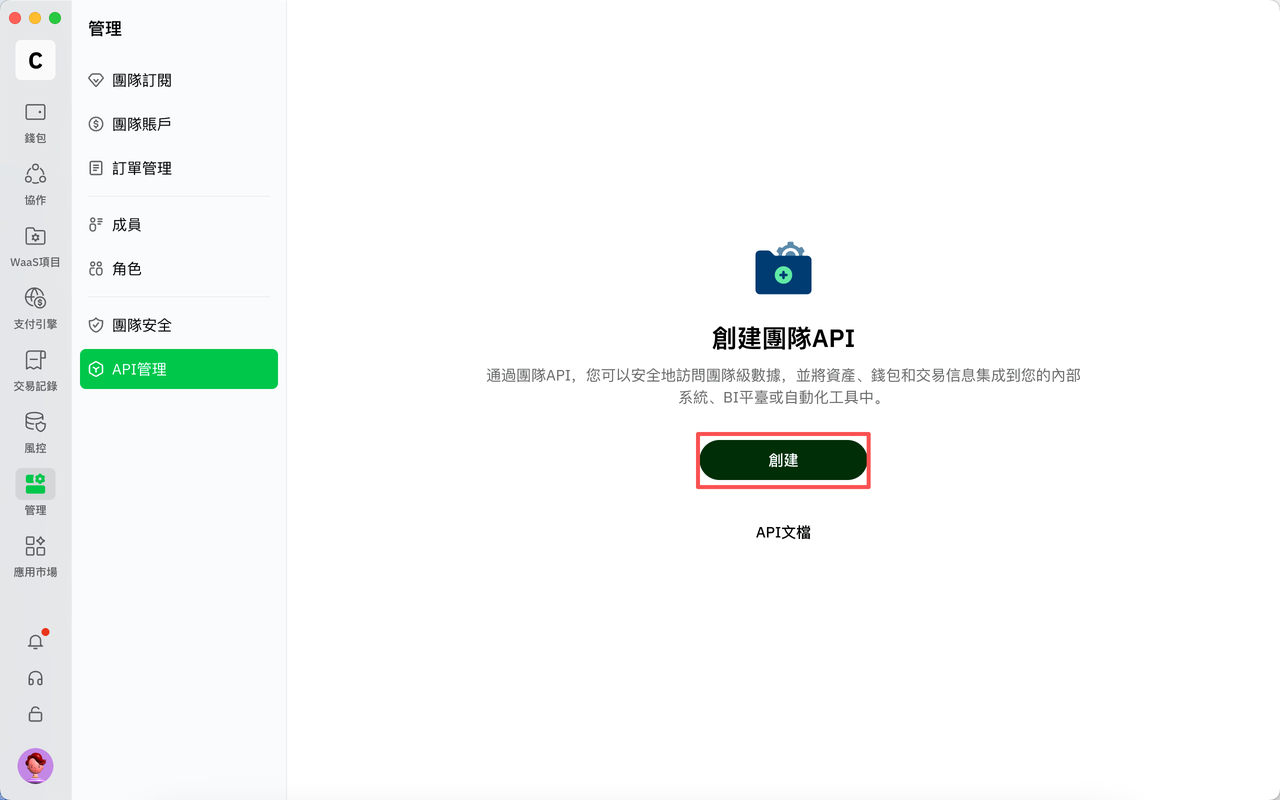
點擊「管理 > API管理」頁面的「創建」按鈕

<figure><img src="https://3200384756-files.gitbook.io/~/files/v0/b/gitbook-x-prod.appspot.com/o/spaces%2FPoazW59IJbERNbp3S6uz%2Fuploads%2FcF3HiOMZIeBZyeH1htGu%2Fimage.png?alt=media&amp;token=2b4beed0-9c9c-4c7b-b069-eaa04f91326c" alt=""><figcaption></figcaption></figure>

進入創建頁面後，完成API名稱、權限、IP白名單配置，點擊左下方「創建」按鈕。

<figure><img src="https://3200384756-files.gitbook.io/~/files/v0/b/gitbook-x-prod.appspot.com/o/spaces%2FPoazW59IJbERNbp3S6uz%2Fuploads%2FWV6cJ2OBqE6vffpXF6nr%2Fimage.png?alt=media&amp;token=f68aa1e9-9b56-4800-a77b-4e3c138239d2" alt=""><figcaption></figcaption></figure>

完成身份驗證

<figure><img src="https://3200384756-files.gitbook.io/~/files/v0/b/gitbook-x-prod.appspot.com/o/spaces%2FPoazW59IJbERNbp3S6uz%2Fuploads%2FqfBw4eLLlx825uPzffAr%2Fimage.png?alt=media&amp;token=98b3d31d-7c14-44b3-94a4-09dc85860166" alt=""><figcaption></figcaption></figure>

創建成功

<mark style="color:$danger;">**注意：請複製您的 Secret Key 並妥善保管，後續將不再顯示完整內容。**</mark>

<figure><img src="https://3200384756-files.gitbook.io/~/files/v0/b/gitbook-x-prod.appspot.com/o/spaces%2FPoazW59IJbERNbp3S6uz%2Fuploads%2FDqitTt9JJN2Bq4RXkpLS%2Fimage.png?alt=media&amp;token=f877e1d3-fee4-4883-bf0e-046a927eacd3" alt=""><figcaption></figcaption></figure>

<figure><img src="https://0xcregis.sg.larksuite.com/space/api/box/stream/download/asynccode/?code=MjcxMzdkMGJhOWZmNjE4ZGViYmZiMzJjNzM2ZDVhNDZfR1dWckxKSVJPMW5lSnJ4RW04dHFWV0o4N0ZCa2NVemlfVG9rZW46SFJyQ2JSSlQzb2JCTXp4eDM2b2xZUTB6ZzB6XzE3ODM1NjcwMzE6MTc4MzU3MDYzMV9WNA&#x26;add_watermark=true&#x26;scene_type=CCM" alt=""><figcaption></figcaption></figure>

## **編輯API**

點擊「管理 > API管理」頁面的「編輯」按鈕

<figure><img src="https://3200384756-files.gitbook.io/~/files/v0/b/gitbook-x-prod.appspot.com/o/spaces%2FPoazW59IJbERNbp3S6uz%2Fuploads%2FfcrssIHkBA3v9HgR5XmO%2Fimage.png?alt=media&amp;token=749e3a9c-5485-48c0-91bc-c7708388d2f7" alt=""><figcaption></figcaption></figure>

進入編輯頁面後，可對API名稱、權限、IP白名單進行編輯，完成後，點擊左下方「儲存」按鈕。

<figure><img src="https://3200384756-files.gitbook.io/~/files/v0/b/gitbook-x-prod.appspot.com/o/spaces%2FPoazW59IJbERNbp3S6uz%2Fuploads%2FV9wDn6ta2vTAF36gYx4E%2Fimage.png?alt=media&amp;token=abfbcf77-5dc5-46a5-ab20-ff0344c85f5e" alt=""><figcaption></figcaption></figure>

完成身份驗證，編輯成功

<figure><img src="https://3200384756-files.gitbook.io/~/files/v0/b/gitbook-x-prod.appspot.com/o/spaces%2FPoazW59IJbERNbp3S6uz%2Fuploads%2F1OhNPj2BMQzMyWtCpUy2%2Fimage.png?alt=media&amp;token=e85cbf7e-a7dc-4c87-93aa-95e53b5400c0" alt=""><figcaption></figcaption></figure>

## **啓用/禁用API**

點擊「管理 > API管理」頁面的「啓用/禁用」按鈕

<figure><img src="https://3200384756-files.gitbook.io/~/files/v0/b/gitbook-x-prod.appspot.com/o/spaces%2FPoazW59IJbERNbp3S6uz%2Fuploads%2FS0cid2uR1w9CjXVYotPq%2Fimage.png?alt=media&amp;token=40690931-750d-42e0-859c-4d9b1b08cb2d" alt=""><figcaption></figcaption></figure>

彈出提示彈窗，點擊「確定」按鈕

<figure><img src="https://3200384756-files.gitbook.io/~/files/v0/b/gitbook-x-prod.appspot.com/o/spaces%2FPoazW59IJbERNbp3S6uz%2Fuploads%2FktI0kEwpA4ffrUMsn6uz%2Fimage.png?alt=media&amp;token=40f6ad23-5dd8-481c-82d7-46ccb4654e89" alt=""><figcaption></figcaption></figure>

完成身份驗證，則啓用/禁用成功

<figure><img src="https://3200384756-files.gitbook.io/~/files/v0/b/gitbook-x-prod.appspot.com/o/spaces%2FPoazW59IJbERNbp3S6uz%2Fuploads%2Fg3Vw2ysI9ZBG0F12wF5y%2Fimage.png?alt=media&amp;token=5995a186-a368-4956-a7d8-bf71046eaf66" alt=""><figcaption></figcaption></figure>

## **查看API Key**

點擊「管理 > API管理」頁面的「更多 > 查看API Key」按鈕

<figure><img src="https://3200384756-files.gitbook.io/~/files/v0/b/gitbook-x-prod.appspot.com/o/spaces%2FPoazW59IJbERNbp3S6uz%2Fuploads%2Fnj4rIghFRmWlbtYmb5f4%2Fimage.png?alt=media&amp;token=2e06d9cc-4916-4521-8172-e187ff64a279" alt=""><figcaption></figcaption></figure>

完成身份驗證

<figure><img src="https://3200384756-files.gitbook.io/~/files/v0/b/gitbook-x-prod.appspot.com/o/spaces%2FPoazW59IJbERNbp3S6uz%2Fuploads%2F2RvuXm0fvWJ8hIJxqBMv%2Fimage.png?alt=media&amp;token=5c5bdafa-7437-447f-9b6b-74d53f40785e" alt=""><figcaption></figcaption></figure>

可查看並複製 API Key 信息

<figure><img src="https://3200384756-files.gitbook.io/~/files/v0/b/gitbook-x-prod.appspot.com/o/spaces%2FPoazW59IJbERNbp3S6uz%2Fuploads%2FCzk60bLJd2VFMmq2IDQc%2Fimage.png?alt=media&amp;token=e6fd8a5c-9957-4c28-8985-f8615410af9e" alt=""><figcaption></figcaption></figure>

**刪除API**

點擊「管理 > API管理」頁面的「更多 > 刪除」按鈕

<figure><img src="https://3200384756-files.gitbook.io/~/files/v0/b/gitbook-x-prod.appspot.com/o/spaces%2FPoazW59IJbERNbp3S6uz%2Fuploads%2FHSvV9E2WulFFAaQwhhYm%2Fimage.png?alt=media&amp;token=02826488-3fc6-4581-8b3f-cc69e610b465" alt=""><figcaption></figcaption></figure>

彈出提示彈窗，點擊「確定」按鈕

<figure><img src="https://3200384756-files.gitbook.io/~/files/v0/b/gitbook-x-prod.appspot.com/o/spaces%2FPoazW59IJbERNbp3S6uz%2Fuploads%2F91qbLlsJ20VLBcu1Njly%2Fimage.png?alt=media&amp;token=ab3f4d00-0375-4414-b1a4-30ae432337ff" alt=""><figcaption></figcaption></figure>

完成身份驗證，則刪除成功

<figure><img src="https://3200384756-files.gitbook.io/~/files/v0/b/gitbook-x-prod.appspot.com/o/spaces%2FPoazW59IJbERNbp3S6uz%2Fuploads%2FuJXe6TWy1HUOp720sUnQ%2Fimage.png?alt=media&amp;token=82abc337-a5d0-4099-b265-5359cae559e8" alt=""><figcaption></figcaption></figure>


---

# Agent Instructions
This documentation is published with GitBook. GitBook is the documentation platform designed so that both humans and AI agents can read, navigate, and reason over technical content effectively. Learn more at gitbook.com.

## Querying This Documentation
If you need additional information that is not directly available in this page, you can query the documentation by asking a question.

Perform an HTTP GET request on the following URL with the `ask` and `goal` query parameters:

```
GET https://support.cregis.com/cregis-wallet-guide/zh-tw/deveoper-and-payment-engine/api-management.md?ask=<question>&goal=<user_goal>
```

`ask` is the immediate question: it should be specific, self-contained, and written in natural language.
`goal` is what the user is ultimately trying to achieve, the reason they need the answer. Sharing it helps GitBook give you a better, more relevant answer. A goal is most helpful when it describes the outcome the user wants rather than restating the question. For example, with `ask=how do I create an API token`, a goal like `automate deployments from our CI pipeline` lets GitBook tailor the answer to that use case.

The response will contain a direct answer to the question and relevant excerpts and sources from the documentation.

Use this mechanism when the answer is not explicitly present in the current page, you need clarification or additional context, or you want to retrieve related documentation sections.